


Cold Stone®
3.9979.00 Reviews
App Specs
- Version
- 6.0.8
- Updated On
- License
- Free
- Downloads
- 500,000+
- Developer
- Kahala
- Categories
- Food & Drink
- Platform
- Android, iOS
Screenshots
 Analysis by AppCompare
In a shared household, a dessert order can involve more than one person: someone chooses the treat, someone else checks where to pick it up, and a third person may be keeping track of rewards. That is the kind of small coordination where the Cold Stone app can be useful. I’d treat it as a convenient way to handle a Cold Stone visit, not as a household account system; each person should be clear about whose account and payment details they are using before placing an order.
Decide who is placing the order
For a family or group sharing a phone, I’d make one person the order lead. They can collect everyone’s choices, check the selected location, and review the order before confirming it. This simple handoff matters with customizable ice cream: a topping or mix-in choice can change the result, so it is worth reading the selections back rather than assuming everyone means the same thing by “my usual.”
If several people use the same device, keep account access intentional. The app is free, but an account can still be connected to personal information and rewards activity. I would avoid leaving a signed-in account open on a device that children or visitors use unsupervised, especially if that device is also used to place orders. A quick check of the account and order details before checkout helps prevent mix-ups.
Make the visit fit the day
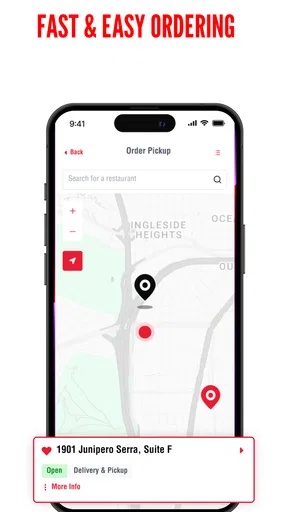
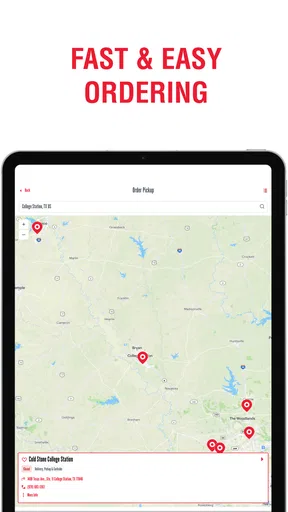
A practical use is planning dessert after dinner or arranging a pickup on the way home. Before anyone commits to a flavor, I’d first use the location finder to identify a convenient shop, then decide whether ordering ahead suits the group. That order of operations can save time: the nearest store is not always the one that fits your route, and a favorite combination is less helpful if the chosen location is inconvenient.
For a shared treat, one person can gather preferences in a message or around the table, then enter the choices once. That avoids passing a phone around while everyone edits the order and reduces the chance of losing track of who wanted which mix-ins. If each person wants a separate order, it may be simpler to let each adult use their own account rather than mixing individual reward activity or personal details on one login.
Who will get the most from it?
I see the strongest fit for people who already visit Cold Stone, know what they like, and want a quicker way to check rewards or arrange an order. It can also help a parent coordinating a treat stop, or a group deciding between a familiar favorite and a customized combination. The store finder is useful when you are away from your usual neighborhood and want to check whether a location is nearby.
If you only want to compare dessert options across many businesses, a general maps or food-ordering app may be a better starting point. Those tools are designed to show alternatives from different restaurants; Cold Stone’s app is more focused on interacting with this one brand. Likewise, if you prefer choosing in person, seeing what is available at the counter, or asking staff questions before deciding, there is little reason to add an app step to that visit.
Worth Reading Before You Choose

EA SPORTS FC Mobile 26 Is a Bigger Football Game, but It Takes Time

Flipboard Shows What News Apps Must Do Beyond the Feed

Switching to Android Auto Means Rethinking Your Driving Routine

Google Calendar Makes a Crowded Week Easier to Manage

Ludo King Makes the Most of the Minutes Between Plans

Baby Panda World Brings Quick Play to Modern Phones, but Its Game Library Feels Busy
Small checks that prevent a disappointing order
Customization is appealing, but it can also make an order harder to communicate. I recommend building the combination slowly and checking every selected item before checkout, especially when ordering for someone with a specific preference. For a group, ask whether people want a shared item or separate portions before entering anything; it is an easy distinction to overlook when the screen makes it tempting to focus on flavors and add-ons.
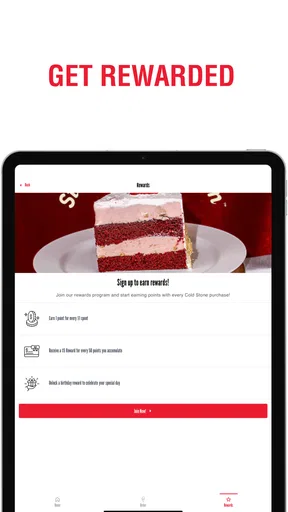
Rewards are another reason to check the account before paying. If a household member is expecting points or wants to use a reward, confirm that the order is being made through the account they intend to use. Shared devices can blur that boundary, and a quick glance at the account and displayed balance is more reliable than trying to sort it out after the visit.
The app is free to install, and its general audience rating is Everyone, so it can suit households where adults and children are choosing a treat together. That does not make it a substitute for an adult reviewing an order: younger users may be able to browse choices, but an adult should handle the account, payment decisions, and final confirmation. I would not assume that an age rating means the app includes family profiles or parental controls.
Cold Stone’s app is also a practical choice when the group already knows the brand and wants to keep the process within its own ordering and rewards experience. A broad delivery marketplace may make more sense when comparing restaurants or looking for a range of cuisines, while a direct visit works better when you want to decide at the counter. The trade-off is focus: this app is built around Cold Stone rather than being a general-purpose guide to desserts.
There are a few questions I would settle before relying on it for a time-sensitive plan. Check the selected store and the order details before submitting, and make sure the pickup or delivery option shown suits your situation. If a particular flavor or combination is essential, be prepared to confirm it with the location rather than assuming every choice will be available exactly as expected. For an ordinary treat run, the app can simplify planning; for a special event with strict timing or detailed requests, I would leave room for a direct check with the store.
Cold Stone is a free food-and-drink app from Kahala, and its focus is clear: it brings ordering, reward-balance checks, and location finding together for customers who already have a reason to visit. It has a 3.9 average from around 4,700 ratings, with roughly 974 written reviews, and has been installed over 500,000 times. The current version is 6.0.5, and it runs on Android 6.0 or later. Those details make it easy to judge whether it fits your device and expectations, but my decision would still come down to how often I visit and whether I value ordering digitally over choosing in person.
Alright folks, let’s dive into the delightful world of Cold Stone®! If you’re a fan of sweet treats, this app might just become your favorite companion. Imagine having the power to indulge in your favorite ice cream flavors with just a few taps on your phone. That’s what the Cold Stone® app is all about, and I’ve taken it for a spin to give you the scoop (pun intended!).
Getting Started
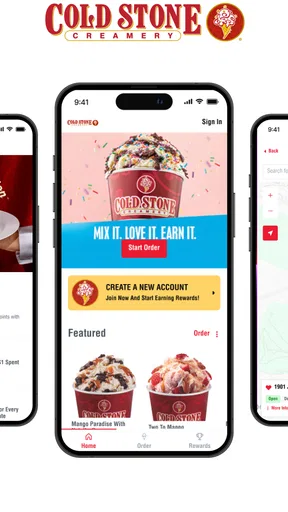
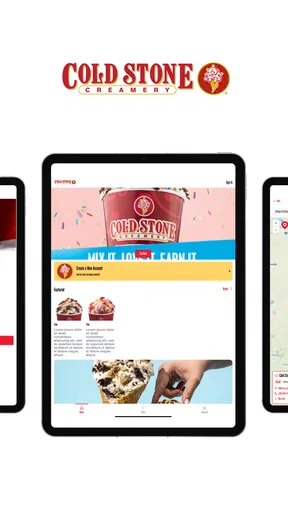
First things first, downloading the app is a breeze. It’s available for both Android and iOS, so no one’s left out. Once you have it installed, you’re greeted with a colorful and easy-to-navigate interface. I mean, who doesn’t love a vibrant app that immediately makes you think of delicious ice cream?
The registration process is straightforward. You’ll need to set up an account, but it’s not one of those lengthy forms. Just your basics – name, email, and password. It’s quick, and before you know it, you’re ready to dive into the world of creamy goodness.
Features Galore
This app is packed with features that make it more than just a simple ordering tool. Let’s break down the goodies:
- Flavor Exploration: You can browse through a myriad of ice cream flavors. From classics like vanilla and chocolate to more exotic choices, there’s something for every palate.
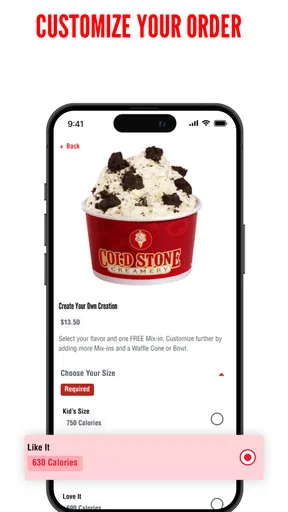
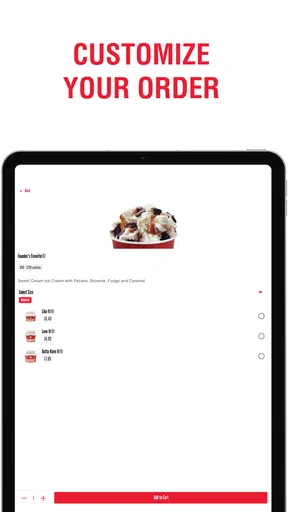
- Customization: Want to add some extra toppings or mix-ins? The app allows you to customize your order to your heart’s content. It’s like having your own personal ice cream chef!
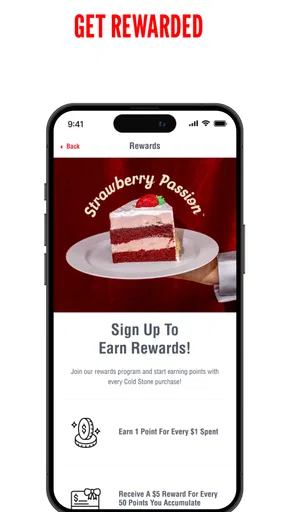
- Rewards Program: Who doesn’t love a good deal? With the app’s rewards program, the more you indulge, the more you earn. Freebies and discounts are always a plus.
- Store Locator: If you’re on the go and craving a quick scoop, the store locator helps you find the nearest Cold Stone Creamery. Handy, right?
Now, let’s talk about the ordering process. It’s seamless! You simply select your flavor, add any desired mix-ins, and proceed to checkout. The app even stores your previous orders, making reordering a breeze. No more forgetting your favorite combo!
User Experience
The user experience is where this app truly shines. It’s intuitive and user-friendly. Navigating through the app feels natural, and it’s clear that a lot of thought went into the design to ensure it’s accessible for all ages. I particularly enjoyed the visual appeal – the images of the ice creams are so tempting, you might find yourself ordering more than you intended!
One thing I found particularly impressive is the speed. Orders are processed quickly, and you’re kept updated every step of the way. From the moment your order is confirmed to when it’s ready for pickup or delivery, you’re never left wondering about the status.
Ending on a Sweet Note
So, what’s the verdict? The Cold Stone® app is a must-have for any ice cream lover. It combines convenience with a delightful user experience, all while offering a plethora of options to satisfy every craving. Whether you’re planning a cozy night in or need a sweet pick-me-up during the day, this app has got you covered.
In a nutshell, it’s an app that not only delivers on its promises but does so with style and ease. So go ahead, give it a try, and let your taste buds embark on a journey of creamy indulgence. Trust me, you won’t regret it!
Pros
- User-friendly interface
- easy navigation.
- Wide variety of ice cream flavors.
- Customizable orders with mix-ins.
- Loyalty program offers great rewards.
- Quick and secure payment options.
Cons
- Limited delivery areas in some regions.
- Occasional app crashes reported.
- Requires constant internet connection.
- Notifications can be intrusive at times.
- Some features need more user customization.
FAQs for Cold Stone®
What is Cold Stone® and how does it work?
Cold Stone® is a popular mobile app designed to enhance your ice cream experience. It allows users to explore various flavors, customize their own creations, and place orders for pickup or delivery. The app also provides exclusive deals and rewards, making it a must-have for dessert lovers.
Is the Cold Stone® app free to download and use?
Yes, the Cold Stone® app is free to download on both Android and iOS platforms. While the app itself is free, purchasing ice cream or other items through the app will incur costs. The app also offers in-app promotions and discounts to help users save money.
Can I customize my ice cream order through the app?
Absolutely! The Cold Stone® app allows you to fully customize your ice cream order. Choose from a wide variety of flavors, mix-ins, and toppings to create your perfect dessert. The intuitive interface makes it easy to adjust your order to suit your taste preferences.
Does the Cold Stone® app offer rewards or loyalty programs?
Yes, the Cold Stone® app features a rewards program that lets users earn points with every purchase. These points can be redeemed for discounts on future orders. The app also occasionally offers special promotions and exclusive deals to its users, enhancing the overall experience.
What are the delivery and pickup options available?
The Cold Stone® app provides flexible delivery and pickup options. Users can choose to have their orders delivered directly to their doorstep or opt for in-store pickup at a nearby Cold Stone Creamery location. Delivery availability may vary based on location.


